The official CLI for the MiniMax AI Platform
Built for AI agents. Generate text, images, video, speech, and music — from any agent or terminal.


中文文档 · Global Platform · CN Platform
- Text — Multi-turn chat, streaming, system prompts, JSON output
- Image — Text-to-image with aspect ratio and batch controls
- Video — Async video generation with progress tracking
- Speech — TTS with 30+ voices, speed control, streaming playback
- Music — Text-to-music with lyrics, instrumental mode, auto lyrics, and cover generation from reference audio
- Vision — Image understanding and description
- Search — Web search powered by MiniMax
- Dual Region — Seamless Global (
api.minimax.io) and CN (api.minimaxi.com) support
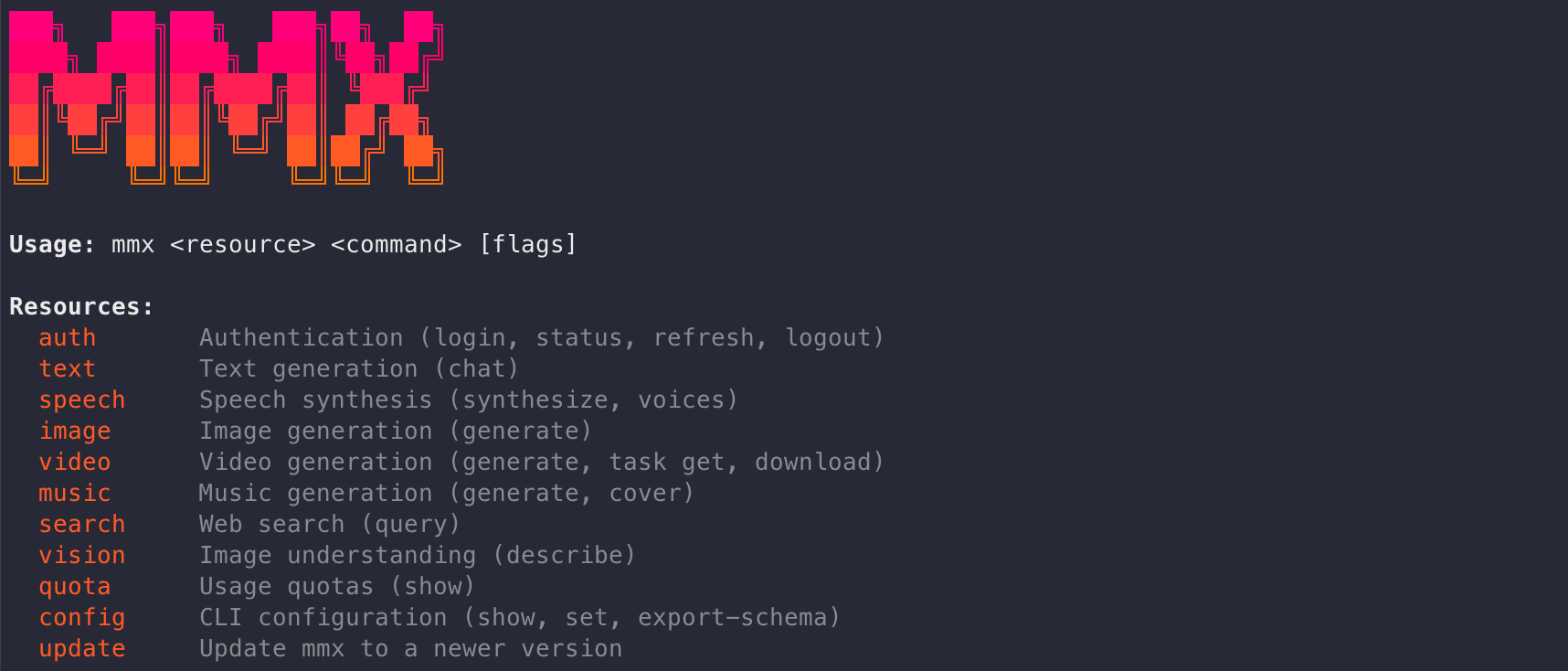
This CLI is designed to be called programmatically by AI agents (Claude Code, Cursor, OpenClaw, etc.).
npm install -g mmx-cliRequires Node.js 18+.
# Clone from fork or upstream
git clone https://github.com/MiniMax-AI/cli.git
cd cli

# Install dependencies
npm install

# Build
npm run build

# Run directly
node dist/mmx.mjs auth login --api-key YOUR_API_KEYgit clone https://github.com/MiniMax-AI/cli.git
cd cli
npm install
bun install
# Run with hot reload
bun run dev -- auth login --api-key YOUR_API_KEY
bun run dev -- text chat --message "test"- Go to platform.minimax.io (global) or platform.minimaxi.com (CN)
- Navigate to Token Plan → copy your API key
# Recommended — use --api-key flag (fast, no browser)
mmx auth login --api-key sk-xxxxx

# Verify authentication
mmx auth status
Note: The OAuth browser flow (
mmx auth loginwithout--api-key) may return 404 on some MiniMax accounts. Use--api-keyflag instead — it works reliably.
The CLI auto-detects region from your API key prefix:
sk-prefix → global (api.minimax.io)eyJ(JWT) prefix → CN (api.minimaxi.com)
Or set manually:
mmx config set --key region --value cn   # for China
mmx config set --key region --value global# Authenticate
mmx auth login --api-key sk-xxxxx
# Verify
mmx auth status
mmx quota
# Text chat
mmx text chat --message "What is MiniMax?"
# Image generation
mmx image "A cat in a spacesuit"
# Speech synthesis
mmx speech synthesize --text "Hello!" --out hello.mp3
# Video generation (async)
mmx video generate --prompt "Ocean waves at sunset"
# Music generation
mmx music generate --prompt "Upbeat pop" --lyrics "[verse] La da dee" --out song.mp3
# Web search
mmx search "MiniMax AI latest news"
# Image understanding
mmx vision photo.jpgimport { spawn } from 'child_process';
const proc = spawn('mmx', ['text', 'chat', '--message', 'Hello'], {
env: { ...process.env },
timeout: 30000,
});
let output = '';
proc.stdout.on('data', (data) => { output += data.toString(); });
proc.on('close', (code) => console.log(output));import subprocess
result = subprocess.run(
['mmx', 'text', 'chat', '--message', 'Hello'],
capture_output=True, text=True
)
print(result.stdout)Add to your agent's skill or instructions:
# Login once
mmx auth login --api-key YOUR_KEY

# Then use any command
mmx text chat --message "..."
mmx image "prompt"mmx text chat --message "Write a poem"
mmx text chat --model MiniMax-M2.7-highspeed --message "Hello" --stream
mmx text chat --system "You are a coding assistant" --message "Fizzbuzz in Go"
mmx text chat --message "user:Hi" --message "assistant:Hey!" --message "How are you?"
cat messages.json | mmx text chat --messages-file - --output jsonmmx image "A cat in a spacesuit"
mmx image generate --prompt "A cat" --n 3 --aspect-ratio 16:9
mmx image generate --prompt "Logo" --out-dir ./out/mmx video generate --prompt "Ocean waves at sunset" --download sunset.mp4
mmx video generate --prompt "A robot painting" --async
mmx video task get --task-id 123456
mmx video download --file-id 176844028768320 --out video.mp4mmx speech synthesize --text "Hello!" --out hello.mp3
mmx speech synthesize --text "Stream me" --stream | mpv -
mmx speech synthesize --text "Hi" --voice English_magnetic_voiced_man --speed 1.2
echo "Breaking news" | mmx speech synthesize --text-file - --out news.mp3
mmx speech voices# Generate with lyrics
mmx music generate --prompt "Upbeat pop" --lyrics "[verse] La da dee, sunny day" --out song.mp3
# Auto-generate lyrics from prompt
mmx music generate --prompt "Indie folk, melancholic, rainy night" --lyrics-optimizer --out song.mp3
# Instrumental (no vocals)
mmx music generate --prompt "Cinematic orchestral" --instrumental --out bgm.mp3
# Cover — generate a cover version from a reference audio file
mmx music cover --prompt "Jazz, piano, warm female vocal" --audio-file original.mp3 --out cover.mp3
mmx music cover --prompt "Indie folk" --audio https://example.com/song.mp3 --out cover.mp3mmx vision photo.jpg
mmx vision describe --image https://example.com/img.jpg --prompt "What breed?"
mmx vision describe --file-id file-123mmx search "MiniMax AI"
mmx search query --q "latest news" --output jsonmmx auth login --api-key sk-xxxxx # Recommended
mmx auth login # OAuth browser flow (may return 404)
mmx auth status
mmx auth refresh
mmx auth logoutmmx auth status is the canonical way to verify active authentication.
~/.mmx/credentials.json exists only for OAuth login. API-key login persists to
~/.mmx/config.json (and --api-key can also be passed per command).
mmx quota
mmx config show
mmx config set --key region --value cn
mmx config set --key default-text-model --value MiniMax-M2.7-highspeed
mmx config export-schema | jq .
mmx update
mmx update latest